
Your customers do not all message you in the same place. Some use a messaging app, some send a DM on social media, and others type into the chat on your website. So an omnichannel chatbot, one AI agent that answers on every channel, is often a better fit than a separate bot for each one.
That said, more channels are not always better. This guide explains what changes when one agent runs everywhere, and when a single channel is honestly enough.
What is an omnichannel chatbot?
An omnichannel chatbot is one bot, with one set of flows and one knowledge base, connected to all the channels your customers use. In other words, you build it once and it answers everywhere.
The alternative is a single-channel bot, or a separate bot per channel. For example, you might have one bot on a messaging app and another on your website, each built and updated on its own.
Today, the bot behind it is often an AI agent rather than a menu. If you are not sure which you need, read our guide on AI agent vs FAQ bot.
Why one AI agent across all your channels works better
Customers message wherever is easiest
People pick the channel that is already open on their phone or screen. Because of this, a customer who finds you through a social post will often DM you there. Meanwhile, a visitor on your pricing page will use the website chat.
Also, customers do not stick to one channel forever. Someone might ask a question on your website today and follow up in a DM next week. Each time, they expect a quick and correct reply, wherever they are.
If your bot only lives on one channel, everyone else waits for a person. As a result, questions go unanswered after hours, and some leads simply leave.
One knowledge base means consistent answers
With separate bots, each one has its own copy of your prices, policies and opening hours. Sooner or later, one copy gets updated and the others do not. Then a customer gets one answer on your website and a different one in a DM.
This matters more than it seems. For example, a wrong price or an old refund rule in one channel can lead to an awkward chat, a refund request or a lost sale.
With one agent, however, there is one source of truth. You update your information once, and every channel uses the new version straight away.
One shared inbox for human handoff
Some chats need a person. When the agent hands off, your team should not have to hunt for the conversation in a different app for each channel.
In a shared inbox, all chats arrive in one place. So your team picks up the handoff and sees the conversation so far, and the customer does not have to repeat themselves.
Build flows once instead of per channel
Every separate bot means a separate build. Also, every change, such as a new offer or a holiday schedule, has to be made several times.
With one agent, you build the flow once and connect it to each channel. Therefore, adding a new channel becomes a connection step, not a new project.
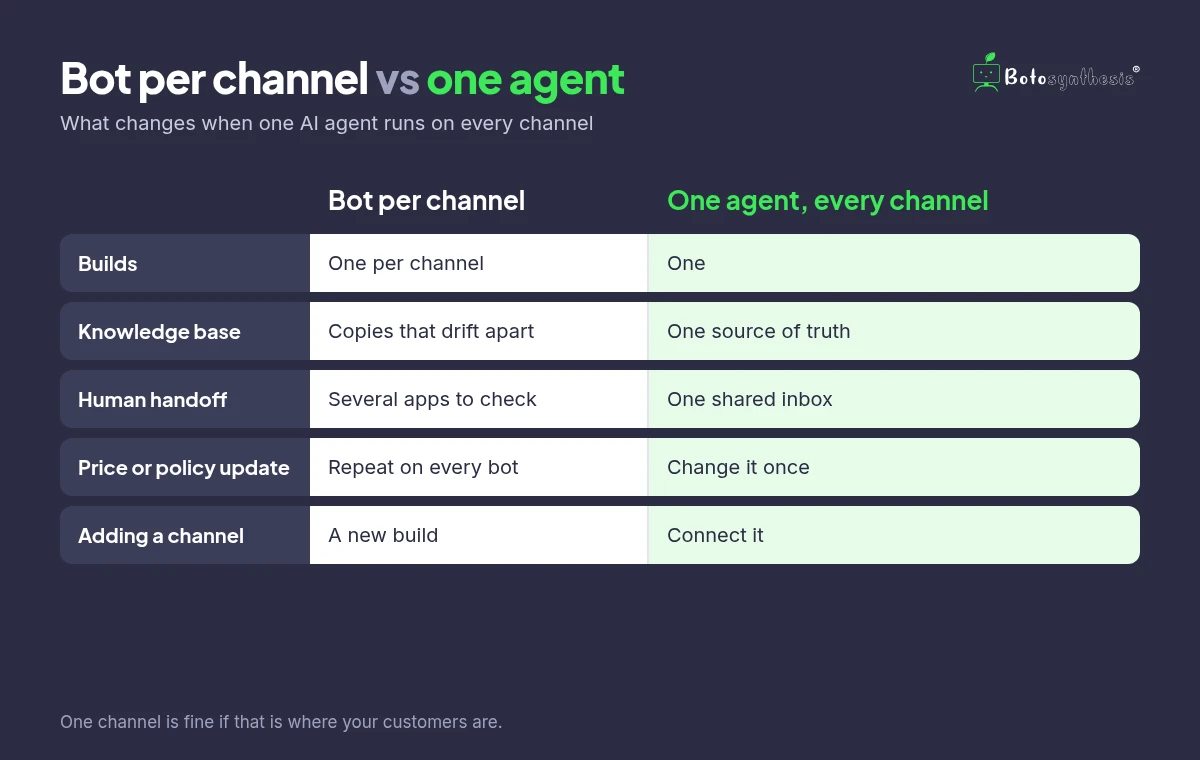
| Separate bot per channel | One agent on every channel | |
|---|---|---|
| Builds | One per channel | One |
| Knowledge base | Several copies that drift apart | One source of truth |
| Human handoff | Team checks several apps | One shared inbox |
| Updating a price or policy | Repeat it on every bot | Change it once |
| Adding a channel | A new build | Connect it |
When a single-channel bot is enough
To be honest, many businesses do not need every channel on day one. A single channel is often fine when:
- Almost all your chats come from one place. If nearly everyone messages you on one app, start there.
- You are just starting. First get one channel working well, then add more.
- Your team is small. In that case, a few well-run channels beat many neglected ones.
- Your use case is narrow. For example, a bot that only sends order updates may not need to be anywhere else.
Also, every channel you add needs someone to watch its handoffs. So if nobody can reply on a channel within a reasonable time, it may be better to leave it out for now.
In short, follow your customers. Look at where your chats actually come from, then add channels when the demand is there.
How to move to one agent across channels
- List your channels and roughly how many chats each one gets.
- Write one knowledge base with your prices, policies, hours and common answers.
- Build the flow once, then connect your busiest channel first.
- Add the next channel and test it with real questions before going live.
- Set clear handoff rules so your team knows which chats are theirs.
How Botosynthesis runs one agent across your channels
Botosynthesis is a no-code platform for building AI agents. You can connect WhatsApp, Instagram, Messenger, Telegram, SMS and web chat, and manage them from one inbox.
Build your own AI agent in the visual workflow builder
First, drag and connect steps in the visual workflow builder. Add menus for fixed answers, then add an AI agent step for free-text questions. After that, the same agent works across the channels you connect.
Bring your own OpenAI or Gemini key, with no markup
Connect your own OpenAI or Gemini API key. Your AI provider bills you directly, and Botosynthesis adds no markup on AI usage. Some platforms charge AI credits on top, so this keeps your real cost visible.
Human handoff in the inbox
Because every connected channel feeds the same inbox, your team works from one screen instead of several apps. When a chat needs a person, the agent hands it off to your team in the inbox. Then your teammate sees the conversation so far and replies from there.
Frequently asked questions
What does omnichannel mean for a chatbot?
It means one bot, with one set of flows and one knowledge base, that answers customers on all your channels instead of a separate bot per channel.
What is the difference between multichannel and omnichannel?
Multichannel usually means you are present on several channels, often with separate tools for each. Omnichannel means those channels are connected, so one agent, one knowledge base and one inbox serve all of them.
Do I need a chatbot on every channel?
No. If almost all your chats come from one channel, or you are just starting, one channel is often enough. Add channels when your customers start using them.
Will customers get the same answers on every channel?
Yes, if one agent and one knowledge base serve every channel. You update your information once, and every channel uses it.
Which channels does Botosynthesis support?
Botosynthesis lists WhatsApp, Instagram, Messenger, Telegram, SMS and web chat, managed from one shared inbox with human handoff.
The bottom line on an omnichannel chatbot
Customers will keep messaging you wherever is easiest for them. So one agent, one knowledge base and one inbox save you rebuilds and keep answers consistent. That said, start with the channels your customers actually use, and grow from there.